Step-by-Step Study Material
Step 1: Understand the Problem Being Solved
Why Do Filters Matter?
Before touching any technical detail, understand why this feature exists.
AI agents search the web to ground their answers in real information. But without controls, an agent might:
| Problem | Real Consequence |
|---|---|
| Cite an unvetted blog for financial advice | Compliance violation |
| Use 3-year-old pricing data | Customer gets wrong information |
| Pull from crowdsourced commentary | Material error in earnings report |
| Mix sources across tenants | BAA or contract violation |
The Core Insight
The agent cannot be trusted to self-filter. System prompts can instruct a model to avoid certain sources, but the model can still ignore those instructions. Hard enforcement must happen at the API/server level.
Step 2: Learn the Two Filter Types
There are exactly two filter categories introduced in connector version 1.2.0.
Filter Type 1: Domain Filter
Controls which websites results can come from.
filters.domainFilter
| Field | What It Does |
|---|---|
filters.domainFilter.include | Allowlist — only return results FROM these domains |
filters.domainFilter.exclude | Denylist — suppress results FROM these domains |
Key Limits:
- Each list supports up to 100 domains
- Both lists are counted independently (100 include + 100 exclude = 200 total entries allowed)
Filter Type 2: Published Date Filter
Controls how recent results must be.
filters.publishedDateFilter
| Field | What It Does |
|---|---|
filters.publishedDateFilter.from | Earliest allowed publication date (inclusive) |
filters.publishedDateFilter.to | Latest allowed publication date (inclusive) |
Key Rules:
- Dates use ISO-8601 UTC format (e.g.,
2026-04-01T00:00:00Z) - Results with no recognized publication date are excluded when this filter is active
- Both fields are optional — you can set just
from, justto, or both
Important: Both Filters Are Optional
Omitting either filter preserves existing behavior — all indexed content remains eligible.
Step 3: Understand the Layered Policy Model
This is the most conceptually important part. There are two levels of filtering:
Level 1: Admin-level policy    (set when creating/configuring the connector)
Level 2: Runtime filters       (set per API call, per request)
The Golden Rule
Runtime filters can NARROW but NEVER EXPAND the admin policy.
An API caller cannot search a domain the admin hasn't approved. An API caller cannot unblock a domain the admin has blocked.
How the Two Levels Combine
Include Lists (Allowlists) → Use INTERSECTION
Only domains present in both the admin list and the runtime list are searched.
Admin allows:   [a.com, b.com, c.com]
Runtime includes: [b.com, c.com, d.com]

Effective allowlist = INTERSECTION = [b.com, c.com]

d.com is silently dropped — not in admin list
Exclude Lists (Denylists) → Use UNION
A domain blocked at either level stays blocked.
Admin blocks:   [x.com]
Runtime excludes: [y.com]

Effective denylist = UNION = [x.com, y.com]
Visual Summary
INCLUDE (allowlist):
Admin ∩ Runtime = Effective
[a,b,c] ∩ [b,c,d] = [b,c]  ← d is dropped

EXCLUDE (denylist):
Admin ∪ Runtime = Effective
[x] ∪ [y] = [x,y]  ← both are blocked
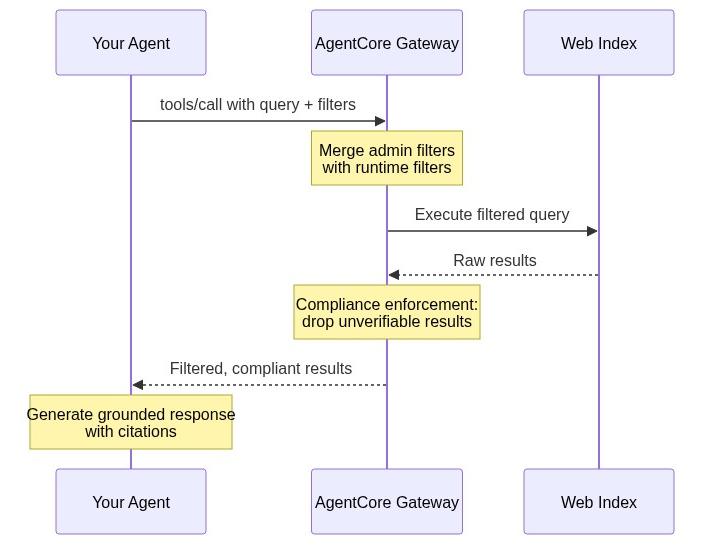
Step 4: Understand the Request Lifecycle
When your agent sends a filtered search request, here is exactly what happens server-side:
Step 1: Agent sends tools/call with query + filters
         ↓
Step 2: Gateway merges runtime filters with admin policy
        (intersection for include, union for exclude)
         ↓
Step 3: Filtered query executes against web index
         ↓
Step 4: Raw results are checked for compliance
         ↓
Step 5: Only verified results return to agent
Everything is server-side. There is:
- ❌ No client-side filtering loop
- ❌ No post-processing by the caller
- ❌ No extra network roundtrips
Precision Over Recall
When filters are active, the system prioritizes precision:
You may receive fewer results, but every result you receive satisfies your filter criteria.
Step 5: Learn the API Structure
Here is the structure of a tools/call payload with filters applied:
{
  "query": "your search query here",
  "maxResults": 10,
  "filters": {
    "domainFilter": {
      "include": ["sec.gov", "investor.gov"],
      "exclude": ["reddit.com"]
    },
    "publishedDateFilter": {
      "from": "2026-04-01T00:00:00Z",
      "to": "2026-06-30T23:59:59Z"
    }
  }
}
Four Independent Lists
| List | Set By | Max Entries |
|---|---|---|
| Admin include | Admin at connector creation | 100 |
| Admin exclude | Admin at connector creation | 100 |
| Runtime include | Developer per API call | 100 |
| Runtime exclude | Developer per API call | 100 |
Step 6: Apply Knowledge to Real Scenarios
Now test your understanding against real use cases.
Scenario A: Legal Team Monitoring SEC Filings
Requirements:
- Only trust
sec.gov - Only results from the current month
Solution:
"filters": {
  "domainFilter": {
    "include": ["sec.gov"]
  },
  "publishedDateFilter": {
    "from": "2026-06-01T00:00:00Z",
    "to": "2026-06-30T23:59:59Z"
  }
}
What happens: Runtime sec.gov intersects with admin allowlist. If sec.gov is in the admin list, it is searched. If not, it is silently dropped.
Scenario B: Pharmaceutical Regulatory Agent
Requirements:
- Only FDA, NIH, ClinicalTrials.gov
- No health blogs — ever — even if they rank #1
Solution:
"filters": {
  "domainFilter": {
    "include": ["fda.gov", "nih.gov", "clinicaltrials.gov"]
  }
}
Key insight: Even if WebMD ranks #1 for the query, it never enters the model's context window.
Scenario C: Trading Desk — Fresh Data Only
Requirements:
- Results from the past 7 days only
- No stale quarterly analysis
Solution:
"filters": {
  "publishedDateFilter": {
    "from": "2026-06-17T00:00:00Z"
  }
}
Key insight: That highly-ranked analysis from last quarter never reaches the model.
Scenario D: Multi-Tenant SaaS Platform
Requirements:
- 200 tenants, each with different source policies
- Cannot create a separate gateway target per tenant
Solution: One shared gateway target. Apply tenant-specific filters dynamically at runtime per API call.
Healthcare tenant call → include: [pubmed.ncbi.nlm.nih.gov, cdc.gov]
Legal tenant call      → include: [law.cornell.edu]
Finance tenant call    → include: [sec.gov, federalreserve.gov]
Key insight: One infrastructure, 200 different enforced policies.
Step 7: Understand Regional Availability and Architecture
Available Regions
| Region | Code |
|---|---|
| US East (N. Virginia) | us-east-1 |
| Europe (Ireland) | eu-west-1 |
| Asia Pacific (Tokyo) | ap-northeast-1 |
Zero Data Egress Architecture
Search queries stay within AWS infrastructure. They are not sent to a third-party search engine or routed outside AWS.
This matters for regulated industries (healthcare, finance, government) because it removes an entire category of compliance review.
Step 8: Know the Setup Requirements
To use runtime filtering:
- Pin your Web Search target to version 1.2.0 (create new or update existing with
UpdateGatewayTarget) - IAM permissions needed:
- Caller needs
bedrock-agentcore:InvokeGatewayon the gateway ARN - Gateway service role needs
bedrock-agentcore:InvokeWebSearch
- Caller needs
- Tool name pattern:
<target-name>___WebSearch - Backward compatible — existing calls without filters continue to work unchanged
Summary: Key Concepts at a Glance
┌─────────────────────────────────────────────────────────┐
│              DOMAIN & DATE FILTERS — SUMMARY            │
├─────────────────────────────────────────────────────────┤
│ TWO FILTER TYPES                                        │
│  • domainFilter (include/exclude, up to 100 each)       │
│  • publishedDateFilter (from/to, ISO-8601 UTC)          │
├─────────────────────────────────────────────────────────┤
│ TWO POLICY LEVELS                                       │
│  • Admin level (set at connector creation)              │
│  • Runtime level (set per API call)                     │
├─────────────────────────────────────────────────────────┤
│ COMBINATION RULES                                       │
│  • Include lists → INTERSECTION (narrower wins)         │
│  • Exclude lists → UNION (more blocked wins)            │
│  • Runtime can NEVER expand admin scope                 │
├─────────────────────────────────────────────────────────┤
│ ENFORCEMENT                                             │
│  • 100% server-side                                     │
│  • No client-side loops or post-processing              │
│  • Precision over recall when filters active            │
├─────────────────────────────────────────────────────────┤
│ ARCHITECTURE                                            │
│  • Zero data egress — stays within AWS                  │
│  • Available: us-east-1, eu-west-1, ap-northeast-1      │
│  • Requires connector version 1.2.0                     │
└─────────────────────────────────────────────────────────┘
Self-Check Questions
Test yourself before moving on:
- What happens when a runtime include list contains a domain not in the admin allowlist?
- If admin blocks
x.comand runtime tries to remove it from the exclude list, what happens? - What date format must be used for
publishedDateFilter? - What happens to results that have no recognized publication date when a date filter is active?
- Can you use domain filtering without date filtering? Can you use date filtering without domain filtering?
- What is the maximum number of domains across all four lists combined?
- Why is server-side enforcement more reliable than system-prompt-based filtering?
Answers: (1) Silently dropped. (2) It stays blocked — runtime cannot unblock admin denials. (3) ISO-8601 UTC. (4) They are excluded. (5) Yes to both — all filters are optional and independent. (6) 400 (4 lists × 100 each). (7) The model can ignore prompt instructions; API-level enforcement cannot be bypassed by the model.